 TGX Account
With the rapid growth in the number of Telegram users, more and more individual users and business teams are using it as their primary communication and community management tool. Telegram has gained widespread popularity worldwide due to its high security, encrypted messaging, and cross-platform support. However, even after successful registration, failing to pay attention to security settings can still lead to risks such as account theft and information leaks.
For this reason, Telegram provides the Two-Step Verification feature, a security mechanism that adds an extra layer of password protection beyond the phone number verification code. This article will provide a detailed introduction to the Two-Step Verification setup process, common questions, and recommendations for overseas accounts on the TGX platform, helping users quickly and securely manage their Telegram accounts.
What Is Telegram Two-Step Verification?
Two-Step Verification (also known as 2FA) is a mechanism that adds an extra layer of security when logging into an account.
-
Principle: In addition to the verification code received on their phone, users need to set an independent password.
-
Purpose:
-
Even if the phone number is stolen or misused by someone else, the account cannot be logged into.
-
Enhance account security and prevent malicious intrusion or data leaks.
-
Provide additional protection for business accounts or high-follower accounts to ensure operational security.
-
With Two-Step Verification, the security of Telegram accounts can be significantly improved, making it especially suitable for users with business operations or community management needs.
How to Set Up Telegram Two-Step Verification
The following steps apply to both personal and business users:
1. Open Settings
-
Log in to Telegram.
-
Tap the menu in the top-left corner → Settings(Settings) → Privacy and Security(Privacy and Security).
2. Enable Two-Step Verification
-
Find Two-Step Verification(Two-Step Verification) on the Privacy and Security page.
-
Tap Set Additional Password(Set Additional Password).
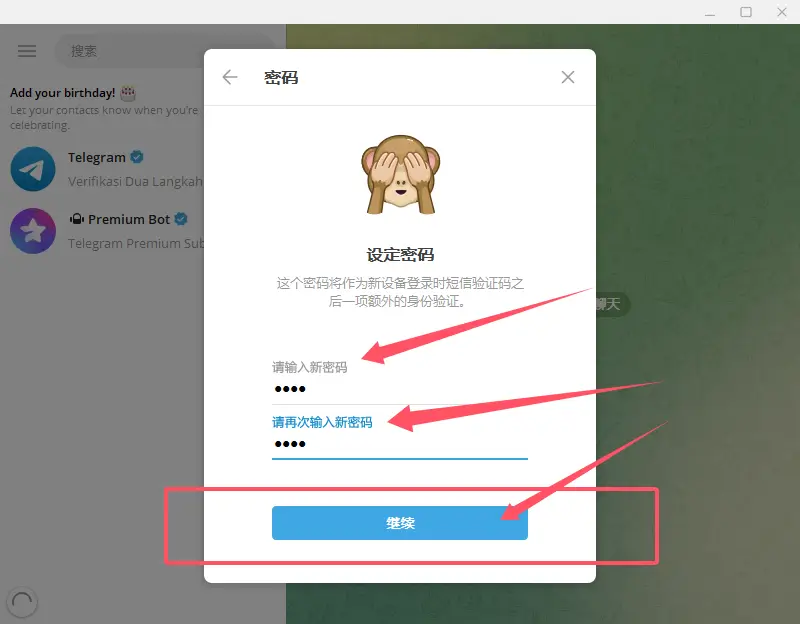
3. Set a Password
-
Enter the password you want to use for the second verification step.
-
The system will ask you to confirm the password again to ensure it is entered correctly.
-
It is recommended that the password be at least ≥8 characters long and include letters, numbers, or special symbols to improve security.
4. Set a Password Hint and Recovery Email
-
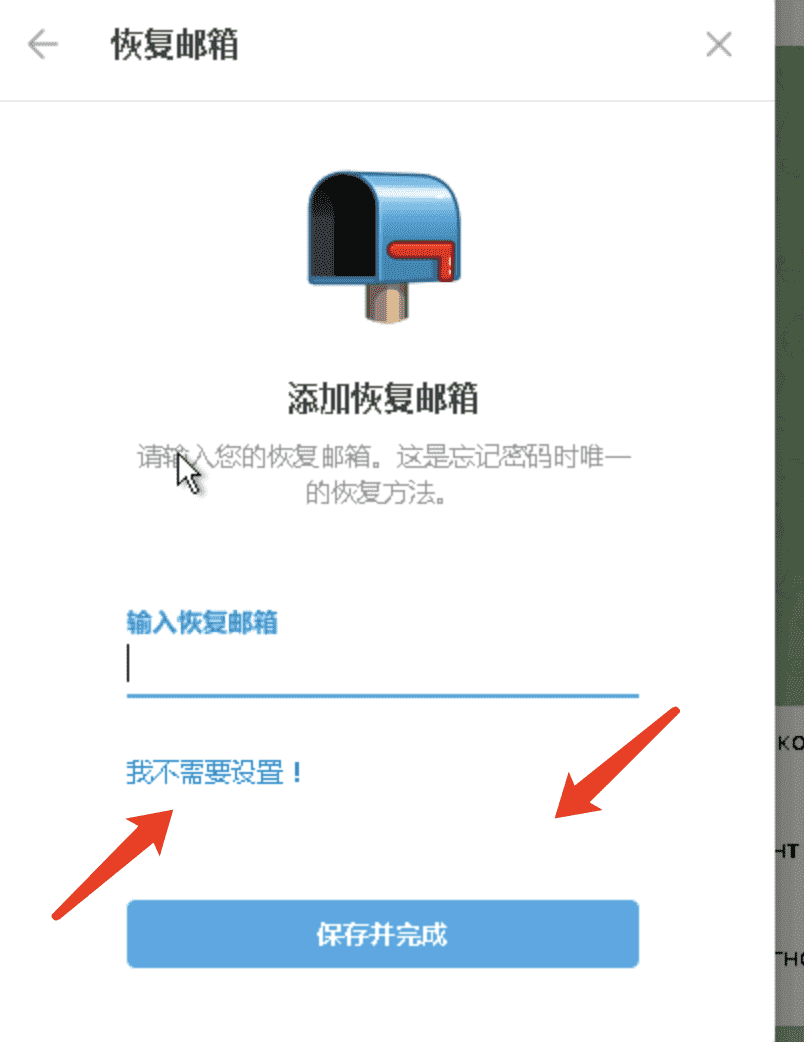
To prevent forgetting your password, you can set a password hint (Password Hint).
-
Add a Recovery Email(Recovery Email) so you can reset your password by email if you forget it.
5. Save Settings
After completing the steps above, two-step verification will be officially enabled. Each time you log in to Telegram, you will need to enter this password in addition to the phone number verification code.
Frequently Asked Questions and Solutions
1. What should I do if I forget my two-step verification password?
-
If you linked a recovery email, you can reset your password through email.
-
If no email is linked and you cannot remember the password, the account will be temporarily inaccessible, so it is strongly recommended to set a recovery email.
2. Phone Lost or Number Unavailable
-
The Telegram account can still be used to log in on other devices with the two-step verification password.
-
If you need to switch phone numbers, make sure to disable two-step verification or update the phone number on the device using the original phone number first.
3. Business or Team Management
-
For team managers, it is recommended to purchase Telegram accounts or other overseas accounts on the TGX platform. These accounts usually have basic security settings configured and can directly enable two-step verification.
Advanced Recommendations: Obtaining Accounts Through the TGX Platform
For new users or those who want to quickly obtain overseas accounts, channels, or high-follower accounts, registering a Telegram account with a local phone number may sometimes result in issues such as not receiving the verification code or registration failure.
1. Introduction to the TGX Platform
The TGX platform specializes in selling overseas social media accounts and high-follower accounts, including:
-
Overseas Telegram account sales
-
High-follower Telegram channels and groups
-
Instagram, Facebook, Twitter/X, and other social media accounts
Through the TGX platform, users can directly obtain usable Telegram accounts or channels, without worrying about not receiving the verification code or registration failure.
2. Advantages of the TGX Platform
-
Save Time: Obtain usable accounts directly, without registration or waiting for verification codes.
-
Account Security: The accounts come from legitimate sources, and you can link an email and set up two-step verification yourself.
-
Suitable for Individuals and Businesses: Individual users can get started quickly, while team users can obtain accounts in batches.
-
Multiple Account Types: From regular accounts to high-follower accounts and channels, meeting different needs.
3. Set Up Two-Step Verification After Obtaining an Account Through the TGX Platform
-
Log in to the TGX platform to obtain an account.
-
Log in to Telegram and go to Settings → Privacy and Security → Two-Step Verification.
-
Set a password, hint, and recovery email to complete the account security upgrade.
-
Use the account immediately for personal or business operations.
This method is particularly suitable for overseas market operations, cross-border teams, or community managers, saving both time and ensuring security.

Best Practices for Two-Step Verification Security Management
-
Strong Password Strategy
-
Password length ≥8 characters, with a mix of letters, numbers, and symbols.
-
-
Update Passwords Regularly
-
It is recommended to change your two-step verification password every 3-6 months.
-
-
Link a Recovery Email
-
Ensure the email account is secure and enable two-factor authentication.
-
-
Hierarchical Account Management
-
For team accounts, assign permissions appropriately and avoid sharing sensitive passwords.
-
-
Combine with High-Follower Accounts Purchased from the TGX Platform
-
With accounts purchased from the TGX platform, you can conduct business directly after completing two-step verification, eliminating the tedious registration process.
-
Telegram two-step verification is a key step in protecting account security. It can effectively prevent account theft and is particularly suitable for high-value accounts, corporate teams, or operators of high-follower accounts.
However, for some users, registering for Telegram itself may involve not receiving a verification code or registration failure. In such cases, the TGX platform provides an efficient alternative: directly obtain overseas Telegram accounts or high-follower accounts, eliminating registration hassles while enabling you to activate two-step verification immediately for security protection.
Whether you are an individual user or a business team, accounts obtained through two-step verification combined with the TGX platform enable you to quickly and securely manage Telegram communities, truly achieving efficient management and dual protection for information security.
📩 Official website: https://www.tgxaccount.com?from=2116
💁♀️Telegram customer service: https://t.me/TGXaccounts